

Mobile API
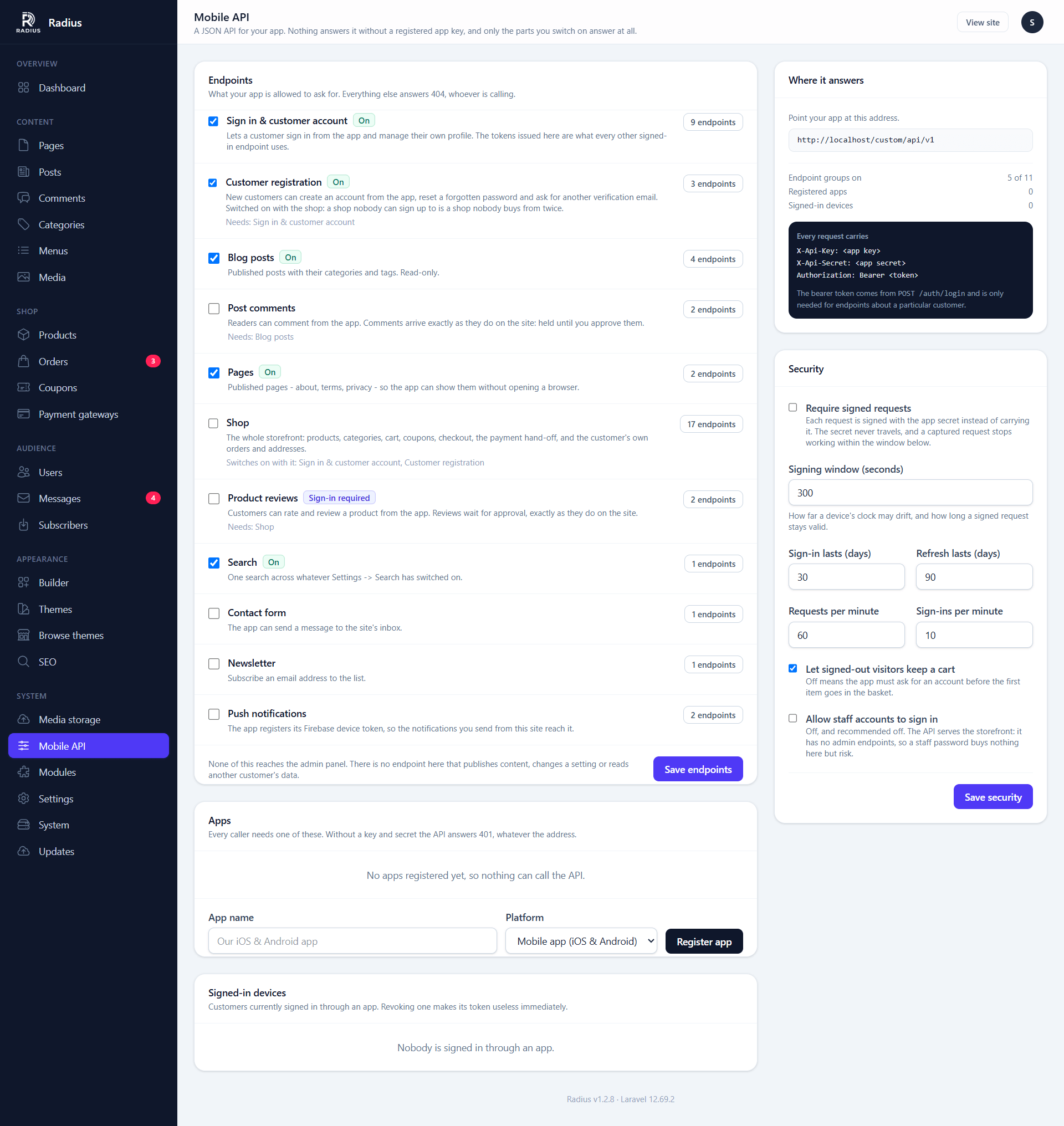
A JSON API for a mobile app: your content, your shop and your customers' accounts. It is a module, and the only one that ships switched off. Until you turn it on, the site answers no API requests at all — the routes are not even registered.
| Screen | Route | Minimum role |
|---|---|---|
| Modules | /admin/modules | Administrator |
| Mobile API | /admin/api | Administrator |
This page is for the site owner. Whoever is building the app wants Mobile API for app developers.
Turning it on
- Open System → Modules and switch on Mobile API.
- Open System → Mobile API, which has now appeared in the sidebar.
- Choose which groups of endpoints to open under Endpoints, and save.
- Register your app under Apps and hand its key and secret to your developer.
Nothing answers until step 4. With the module on but no app registered, every request is refused.
The screen is admin-only. Registering an app issues a key to your storefront, so an editor never sees it.
Nobody can use it just by knowing the address
Every request has to name a registered app and prove it holds that app's secret. There is no public mode, and no endpoint skips the check — not even the product list. A request without credentials is refused before it reaches any of your content.
So the API address being printed in an app, a log or a forum post does not matter. Without a valid key and secret it answers 401 and nothing else.
Apps
Each app you register gets two things:
| What it is | Where it goes | |
|---|---|---|
| App key | A public identifier, starting rad_ | Safe to write down. On its own it opens nothing |
| App secret | 64 random characters | Into the app's configuration, never into a public repository |
The secret is shown once
Right after you register an app — or generate a new secret — the screen shows the secret in a green box. Copy it then. It is stored encrypted for the server's own use and is never shown again. If it is lost, generate a new one.
Per app you can:
- New secret — replaces the secret. Every build of the app still carrying the old one stops working immediately. Do this if a secret leaks.
- Switch off — the app is refused until you switch it back on. Customers stay signed in and resume when it comes back.
- Delete — removes the app and signs out every device signed in through it.
Register one app per product, not per platform, unless you want to be able to cut off the Android build without touching iOS.
Endpoints
Each group of endpoints is a checkbox. Anything not switched on answers 404, to everyone, credentials or not. Show endpoints next to each group lists exactly what it opens up.
| Group | Covers | On by default |
|---|---|---|
| Sign in & customer account | Signing in, profile, password, signed-in devices | Yes |
| Customer registration | Sign-up, password reset, verification email | Yes |
| Blog posts | Posts, categories, tags | Yes |
| Post comments | Reading and leaving comments | No |
| Pages | Published pages | Yes |
| Shop | Products, cart, coupons, checkout, orders, addresses | No |
| Product reviews | Reading and leaving reviews | No |
| Search | One search across everything searchable | Yes |
| Contact form | Sending a message to your inbox | No |
| Newsletter | Subscribing an address | No |
| Push notifications | Registering a device for push | No |
The defaults are applied the first time you open the screen. The rule behind them: reading published content is on, anything that writes or takes money is off until you choose it.
Groups know what they need
- Switching the Shop on switches Sign in and Registration on with it. A shop nobody can sign up to is a shop nobody buys from twice. You can switch Registration back off afterwards if you want a sign-in-only app.
- Comments need Blog posts, and Reviews need the Shop. Switching a group on switches on what it needs; switching that off takes the dependent group with it. The screen tells you when it did either.
- A group whose module is off cannot be switched on. There is no shop API on a site with the eCommerce module switched off, whatever the checkbox said before.
It is your storefront, not your admin panel
The API has no admin endpoints. Nothing in it publishes content, changes a setting, reads another customer's data, or touches an order that is not the caller's own. The rules the website follows still apply:
- Comments and reviews left from the app wait for your approval.
- Prices are always read from your products, never from the app.
- Guest checkout, stock tracking, coupons and the countries you sell to all follow your Shop settings.
- Messages land in Messages, subscribers in Subscribers, orders in Orders — nothing about where something came from changes where you find it.
Security options
| Option | Default | What it does |
|---|---|---|
| Require signed requests | Off | Each request is signed with the app secret instead of carrying it. The secret never travels, and a captured request stops working within the signing window. Better, but more work for your developer |
| Signing window | 300 seconds | How long a signed request stays valid, and how far a phone's clock may drift |
| Sign-in lasts | 30 days | Lifetime of a customer's access token |
| Refresh lasts | 90 days | How long a customer stays signed in without opening the app |
| Requests per minute | 60 | Per app, per IP address |
| Sign-ins per minute | 10 | Per IP address, across sign-in, sign-up and password reset |
| Let signed-out visitors keep a cart | On | Off means the app must ask for an account before the first item goes in the basket |
| Allow staff accounts to sign in | Off | Keeps admin and editor passwords out of the app entirely |
Leave staff sign-in off
The API serves customers. It has no admin endpoints, so a staff account gains nothing by signing in through it — but a staff password typed into an app, or a stolen app credential pointed at one, is risk with no upside.
Signed-in devices
The bottom of the screen lists customers signed in through an app, most recent first. Sign out ends one session immediately; Sign out all ends every one, and everybody has to sign in again.
Customers can do the same for themselves from inside the app, and changing a password signs every other device out automatically.
Paying from the app
Cash on delivery and bank transfer are settled inside the app: the customer places the order and sees your instructions.
Every other gateway opens in a browser or web view, through a link that is signed and expires after 30 minutes. From there it is the website's own payment flow — the same provider pages, the same checks, the same webhooks — so there is nothing extra to configure under Payment gateways.
If the API stops answering
| Symptom | Likely cause |
|---|---|
Everything 404s | The module is off, or the route cache predates switching it on — clear the caches under System health |
Everything 401s | Wrong key or secret, the secret was regenerated, or signed requests were switched on and the app does not sign |
403 "app has been switched off" | The app is switched off under Apps |
One group 404s | That group is not switched on, or its module is off |
429 | The rate limit — raise it, or look for an app retrying in a loop |
| A staff account cannot sign in | Working as intended; see Allow staff accounts to sign in |
The API address can be moved off /api with CMS_API_PREFIX if your site already uses that path.