

Updates & backups
Radius can install new releases itself. Nothing is ever applied automatically — installing is always a deliberate click.
| Screen | Route | Minimum role |
|---|---|---|
| Updates | /admin/updates | Administrator |
| Update result | /admin/updates/finalize | Administrator |
Administrator only
This section rewrites the application's own code. An editor cannot reach it.
The updates screen
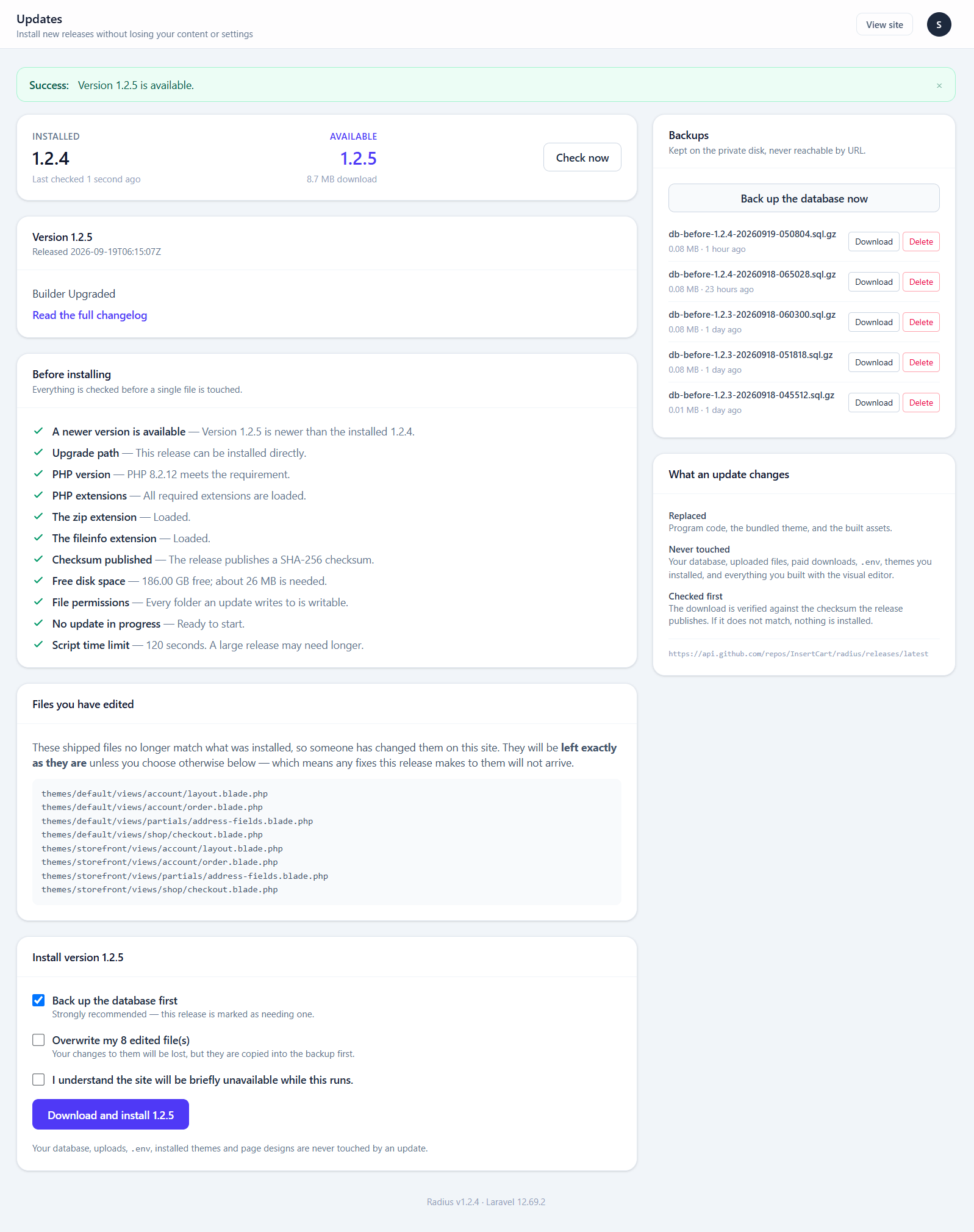
It shows your installed version, whatever release is available, and the release notes. The site checks once a day, or press Check for updates.
Where updates come from
CMS_UPDATE_URL in .env points at a JSON manifest. For the official build that is the GitHub releases endpoint:
CMS_UPDATE_URL=https://api.github.com/repos/InsertCart/radius/releases/latestA fork points it at its own repository, or at a hand-written manifest — the reader accepts both shapes. GitHub's endpoint already excludes drafts and pre-releases, so a draft release is never offered to anybody.
Unset the variable to disable update checking entirely, which is what a white-label build usually wants. See Branding.
Before you update
- Take a backup. The updater offers to; take it.
- Read the release notes for anything tagged breaking.
- If you have edited shipped files, read what an update touches first.
- Update at a quiet hour. The site is briefly unavailable.
What an update does and does not touch
This is the section worth reading before your first update.
Replaced:
app/  vendor/  resources/  routes/
database/migrations/  public/build/
themes/default  themes/storefront  (the bundled themes)
root files: artisan, composer.json
The exact list is in config/updates.php, and it is an allowlist — a path not on it is never written, however the archive is constructed. A release cannot reach your .env, your uploads, or a theme you bought.
Never touched:
.env
storage/          (uploads, paid downloads, logs, backups)
public/storage
public/themes/
any theme you installed yourself
Your database is migrated, never reset.
public/themes/ is regenerated, not edited
The updater never writes to public/themes/ directly, but each update re-copies every theme's assets/ folder into it. Change a theme's files in themes/<slug>/ — anything edited in public/themes/ is replaced on the next update.
Visitors get the new styles without clearing their cache
Two kinds of file change when an update restyles the site, and neither needs anyone to clear a browser cache:
- The CMS's own CSS and JavaScript is built with a fingerprint in the file name —
app-C3EW5EV7.css. A new release is a new name, so browsers fetch it. - Theme assets keep a fixed path, so
theme_asset()appends a version taken from the file itself:theme.css?v=b11748a7f3. When an update changes the file, the address changes with it.
Server-side caches — compiled views, config, routes and cached pages — are cleared as the last step of every update.
Your edits to shipped files are preserved
Radius records a checksum of every file it ships. Anything that no longer matches was changed on your site, so it is skipped and reported rather than overwritten.
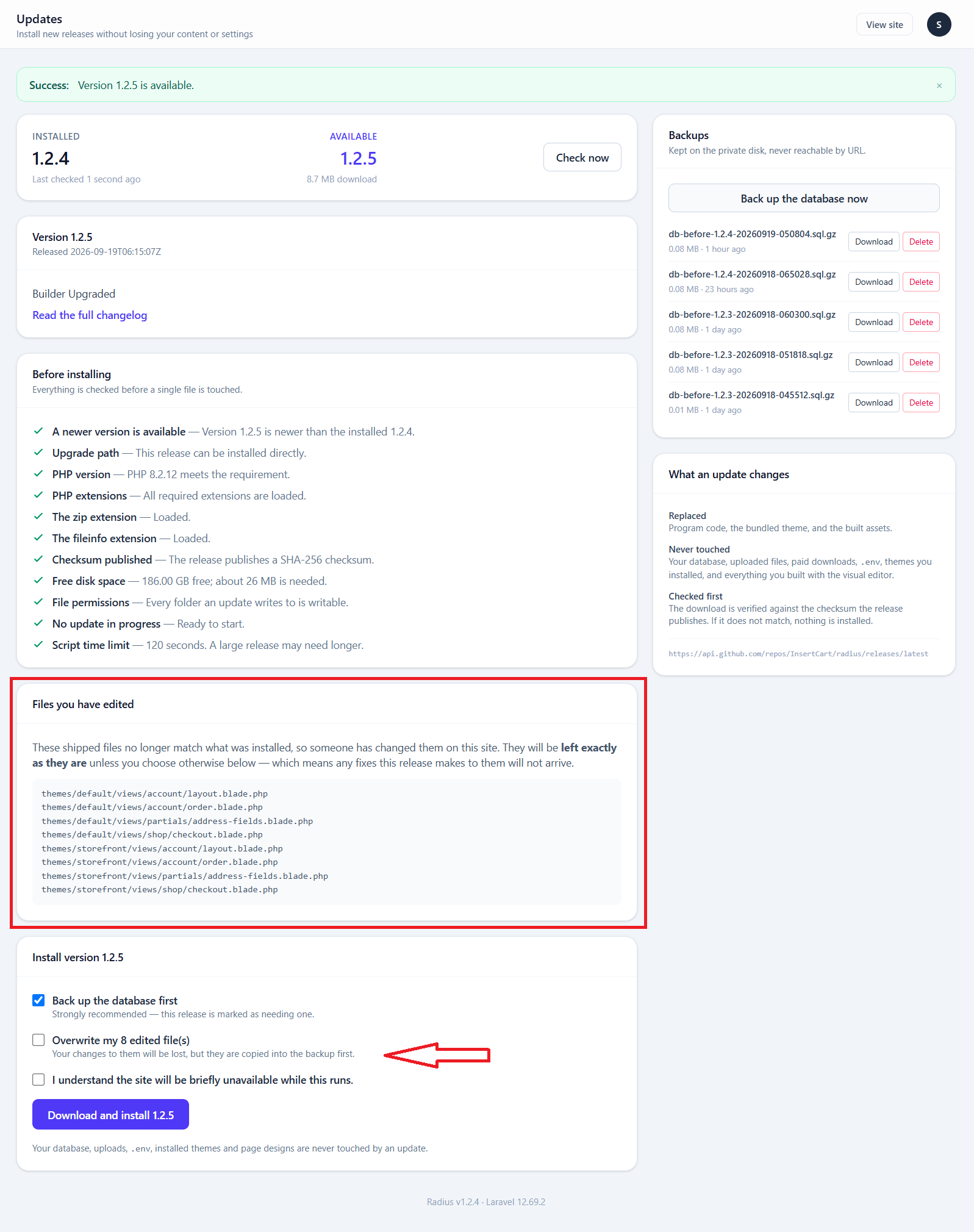
Tick the override if you would rather take the new version.
This is a report, not a resolution
A skipped file keeps your version, which may be incompatible with the new release. If you have customised shipped files, the durable fix is to move those changes somewhere an update does not touch — a custom theme, Custom CSS, or your own widget classes kept in version control.
Backups
Before any file is replaced, the updater takes a database dump and copies every file it is about to overwrite.
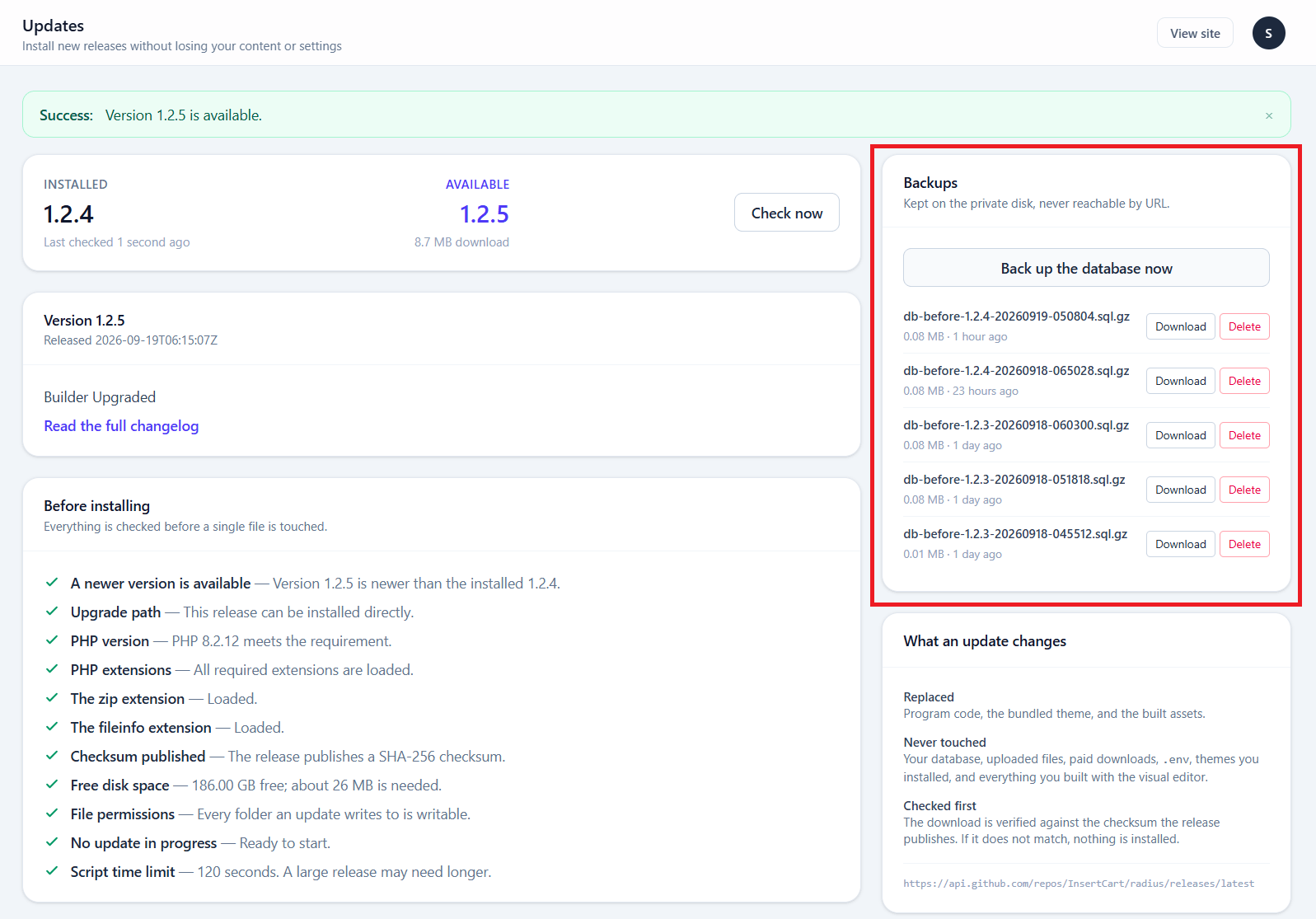
| Location | storage/app/private/backups/ — no public URL |
| Retained | The five most recent |
| Downloadable | Yes, from this screen |
You can also take one at any time with Back up now, independent of updating.
Five backups is not a backup strategy
These exist to make an update reversible, not to protect you from a failed disk or a mistaken deletion three weeks ago. Download them, or take your own off-server backups as well.
Rolling back
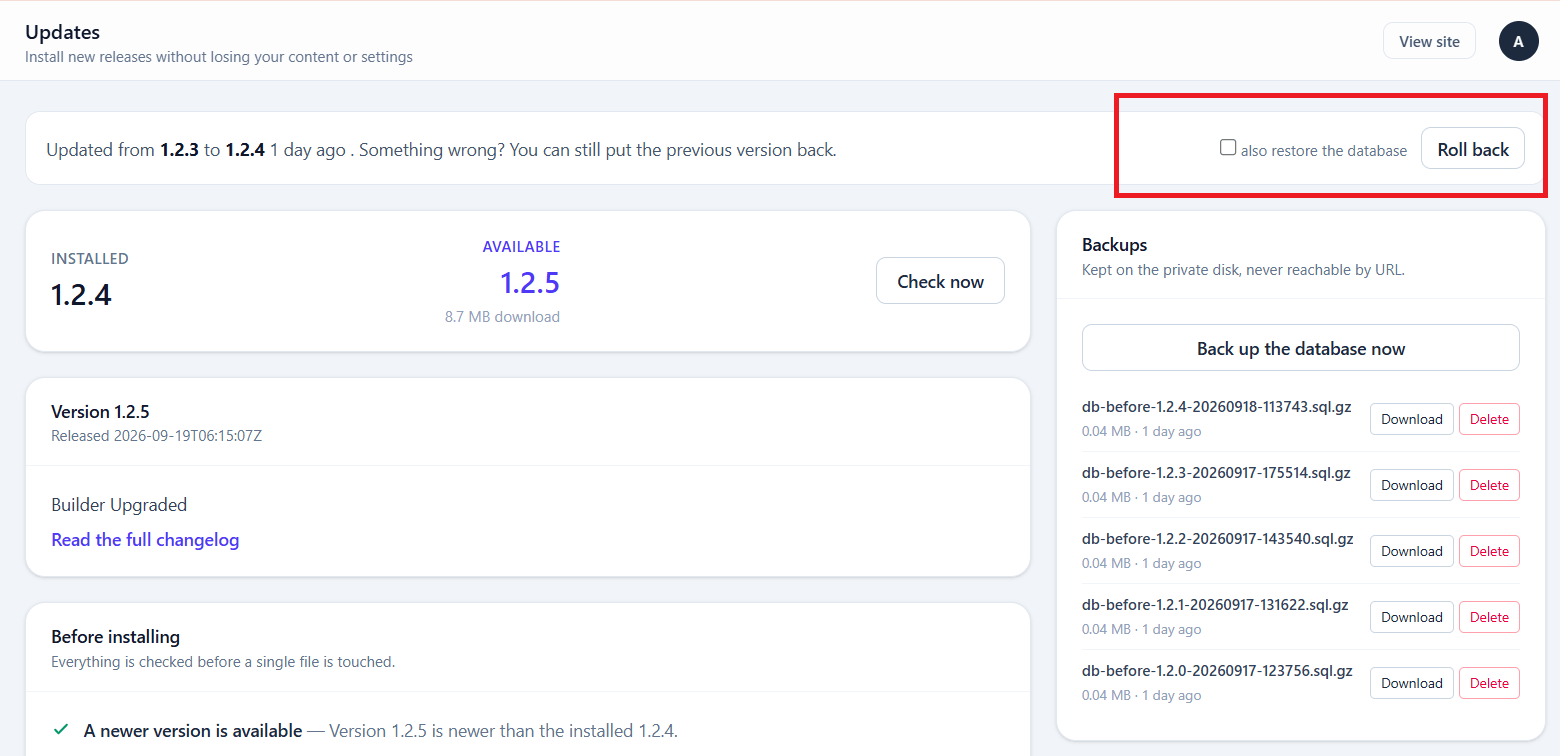
Roll back restores the database and the files, removes files the release added, and drops tables its migrations created.
The option stays available after a successful update, because an update can complete cleanly and still turn out to have broken something.
A rollback reverts your data too
It restores the database dump taken before the update. Orders placed and content written since the update are lost. On a busy shop, that is a real cost — weigh it against whatever the update broke.
Updating over SSH instead
On a server with SSH, this does the same work with no request timeout to run into — the most reliable route for a large release:
php artisan cms:updateIf a browser update times out halfway, this is the recovery path.
How a release is verified
The archive becomes program code running on your server, so it is checked before it is trusted:
| Check | Why |
|---|---|
| HTTPS only | Plain http is refused outright |
| SHA-256 must match | A download nobody verified is a very large hole |
| Version inside the archive must agree with the manifest | Catches a mis-uploaded or swapped ZIP |
| Path allowlist | A release cannot write outside the list above |
min_version, min_php, required extensions | Refuses an update your server cannot run |
If any check fails, the update stops before touching anything.
Installing a release by hand
On hosting with no SSH, some owners unzip a release over the site with FTP or the file manager. That copies the files but runs no migrations, so the code is newer than the database — and pages fail as soon as one reads a column that does not exist yet.
Radius notices. Every admin page checks whether the database is behind the files, and shows a banner with a Finish the update button:
- It takes a database backup first
- Then it runs the migrations, registers new modules, gateways and settings, adds any new
.envkeys and clears every cache - It is safe to press again; a site already up to date just says so
An editor sees the banner but no button, because updating is administrator-only.
Over SSH, the same work is one command:
php artisan cms:update --finishUnzipping over the site skips the safety checks
The in-panel updater verifies the download, refuses a release your server cannot run, skips shipped files you edited, and can roll the whole thing back. A hand-copied release has none of that. Use it only when the panel cannot reach the update server.
After updating
- Check System → System for new warnings
- Finish the update if you copied the files in by hand — the banner above, or
php artisan cms:update --finish. The in-panel updater does this for you - Clear the caches
- Load the public site signed out
- If you run a shop, open a recent order and place a test order
If an update fails
| Symptom | Do this |
|---|---|
| Timed out mid-update | Run php artisan cms:update over SSH |
| Banner says the update is not finished | Press Finish the update, or run php artisan cms:update --finish |
| Site returns 500 | Read System → Logs, or storage/logs/ over FTP |
| Something subtly broken | Roll back, noting the data cost above |
| "Version mismatch" | The ZIP and manifest disagree — a packaging error, not your problem to fix |
| Extraction failed | Check disk space and that storage/ is writable |
Test on a copy first
For a site that matters, copy it to a subdomain, update the copy, and look around before touching production. This is the whole reason the backup is taken first, but a staging copy costs you nothing but disk.